Japan Stigmatized Property 3 Controls Hub
Every input that keeps a 00:00–05:00 shift alive on Steam, macOS, iOS, and Android.
Why controls decide the shift
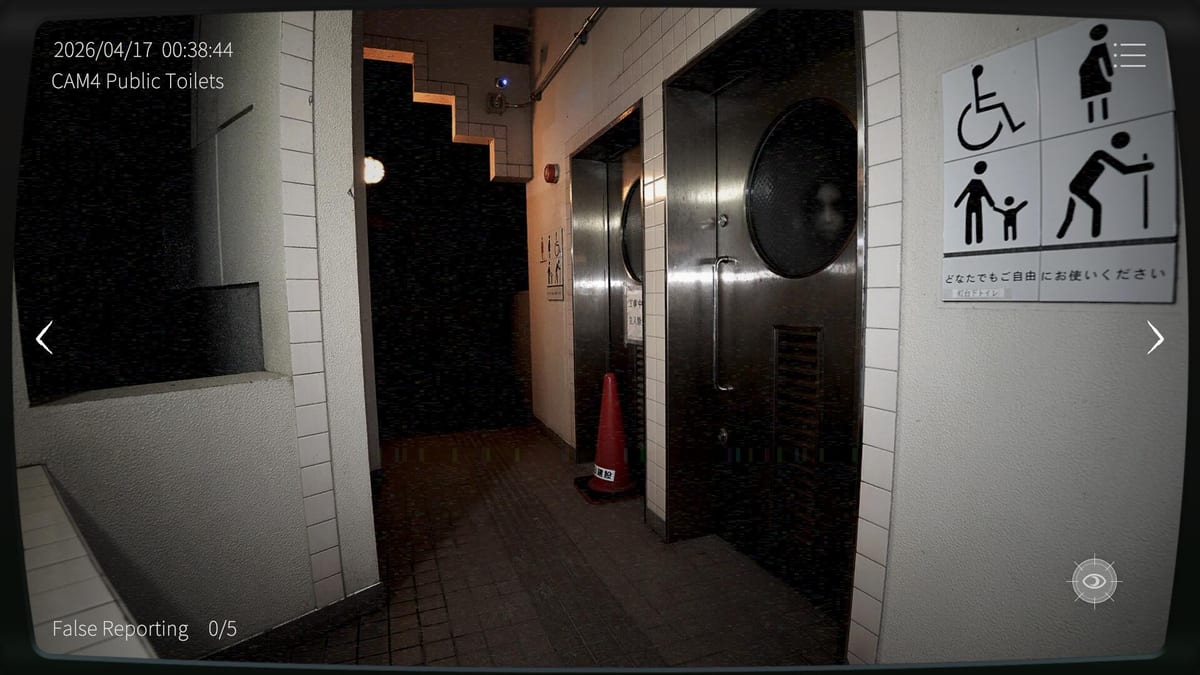
Japan Stigmatized Property 3 is a surveillance loop, not a chase game. You rotate cameras, compare each feed against the midnight baseline, toggle night vision when a change only appears in the dark, and hold-click a report when you are sure. Miss four concurrent anomalies, or spam false reports, and the association ends your shift. The How to Play guide explains fail math; this Controls Hub focuses on the inputs themselves so muscle memory stays ahead of panic.
Steam lists keyboard-only and mouse-only options. Mobile uses touch equivalents. Cross-play co-op does not invent a third scheme—it shares the same camera language and unlocks a thermal mode when two officers share a room. Treat this page as the desk card you reread before Hazard Pay.
Core PC bindings
A / D — camera rotation
A and D step through the property’s camera list. Early Mixed reviews call out occasional A/D friction: a press that feels ignored, a skip that lands on the wrong feed, or a rotation that desyncs from what partners see in co-op. When that happens, stop mashing. Tap once, wait for the feed to settle, then confirm the camera label before you report. A wrong report on the wrong camera is still a false report.
Build a fixed rotation habit. Finish a full A/D lap every few minutes even when nothing seems wrong. Ghosts and object swaps love the cameras you skipped while staring at one cluttered room. Pair the habit with the Shift Checklist so you do not invent a new route mid-scare.
W — night vision toggle
W flips night vision (NV). Some anomalies only read on the standard feed; others only read under NV. If you never press W, you are playing half a game. If you live in NV forever, you will miss bright-feed-only changes and train yourself to over-report noise.
Best practice: on every camera stop, glance standard, tap W, glance NV, tap W again to return, then move with A/D. That four-beat pass is slower than panic scrolling and far safer. The Night Vision page expands on mode-locked phenomena; use it after you can toggle without looking at the keyboard.
Hold-click — confirm a report
Reporting is a hold-click, not a casual tap. The hold exists so you do not nuke your false-report streak while flinching at a knock. Confirm the change, hold, release only when the UI accepts the report. On Hazard Pay (特別手当), the false-report budget shrinks to three mistakes, so patience is part of the binding.
Audio helps. Knocks and moans often telegraph dangerous ghosts. Hearing the cue does not finish the job—you still must find the camera and hold-click before four unresolved anomalies stack. See False Reports for streak recovery rules.
Esc — pause and settings
Esc opens the menu for volume, leave options, and settings. Steam supports custom volume controls; raise master audio early. Many fails start as “I never heard the knock,” not “I never understood A/D.” Do not pause mid-ghost if the threat timer is live—report first, menu later.
Mouse-only and keyboard-only notes
If you remapped or enabled a mouse-only path, still treat camera switching as a deliberate cycle, not a free-look wander. Keyboard-only players should keep one finger parked near W so NV does not become an afterthought. Accessibility options change how you press; they do not change the fail math.
Mobile and cross-play inputs
On iOS and Android, camera steps, NV, and report holds map to on-screen controls. Cross-play with Steam means a partner may rotate faster than you can tap. Agree on a callout format: camera number, mode (standard / NV / thermal), and what changed. Room ID and password setup lives on How to Co-op and Cross-play.
In co-op, thermal scanning becomes available. After a standard + NV pass, check thermal when heat or silhouettes matter. Do not let thermal replace NV—mode-locked anomalies still exist. The Thermal Camera page covers when to trust the heat view.
Shift workflow that uses every key
- At 00:00, memorize baselines while the first half hour is quieter.
- Start the A/D loop; never skip a camera for more than a few minutes.
- On each stop: standard glance, W, NV glance, W back.
- On audio cues, interrupt the loop, find the threat, hold-click, then resume the loop.
- Reset false-report pressure with correct reports instead of freezing.
- On Hazard Pay, expect denser spawns and a three-false budget—see Hazard Pay.
Troubleshooting A/D and report friction
If A/D feels sticky, verify focus is on the game window, not chat overlays. Restart the shift if rotation stays desynced. If hold-click fails, check you are not already at the false-report limit and that the cursor is on the intended anomaly region. Stream overlays can steal clicks; hide them during hard clears.
Patch notes may adjust feel over time. Track platform notes in Platforms and keep this hub as the input bible until an official remapping UI appears.
Streaming-friendly control hygiene
The association permits streaming and Super Chats. Keep Esc volume tweaks ready so jumpscares do not clip your mic. Narrate camera numbers for viewers—it also forces you to stay oriented when A/D stutters.
Where to go next
Practice the loop on Sugiya Ryokan before clutter-heavy Hazard Pay nights. Use Achievements only after Normal clears feel automatic. Controls are not flavor text in Japan Stigmatized Property 3—they are the entire combat system, and A/D plus W plus a patient hold-click are how you reach 05:00 with your streak intact.
Frequently Asked Questions
Quick answers for Japan Stigmatized Property 3 shifts.
What are the main Japan Stigmatized Property 3 PC controls?
A and D rotate cameras, W toggles night vision, hold-click reports anomalies, and Esc opens the menu. Steam also advertises mouse-only and keyboard-only options.
Why do some anomalies only show with night vision?
Camera modes are part of the puzzle. Some phenomena appear only on the standard feed or only under night vision, so toggle W on every camera pass.
What should I do if A/D feels buggy?
Stop mashing, tap once, wait for the feed to settle, and confirm the camera label before reporting. Early reviews mention A/D friction; focus and overlay conflicts can also steal inputs.
Does co-op change the control scheme?
Co-op keeps the same camera language and unlocks thermal scanning for the pair. Cross-play partners should call out camera, mode, and change clearly.