Japan Stigmatized Property 3 How to Report Anomalies in JSP3
Hold-click discipline, verification order, and clean reports under concurrent pressure.
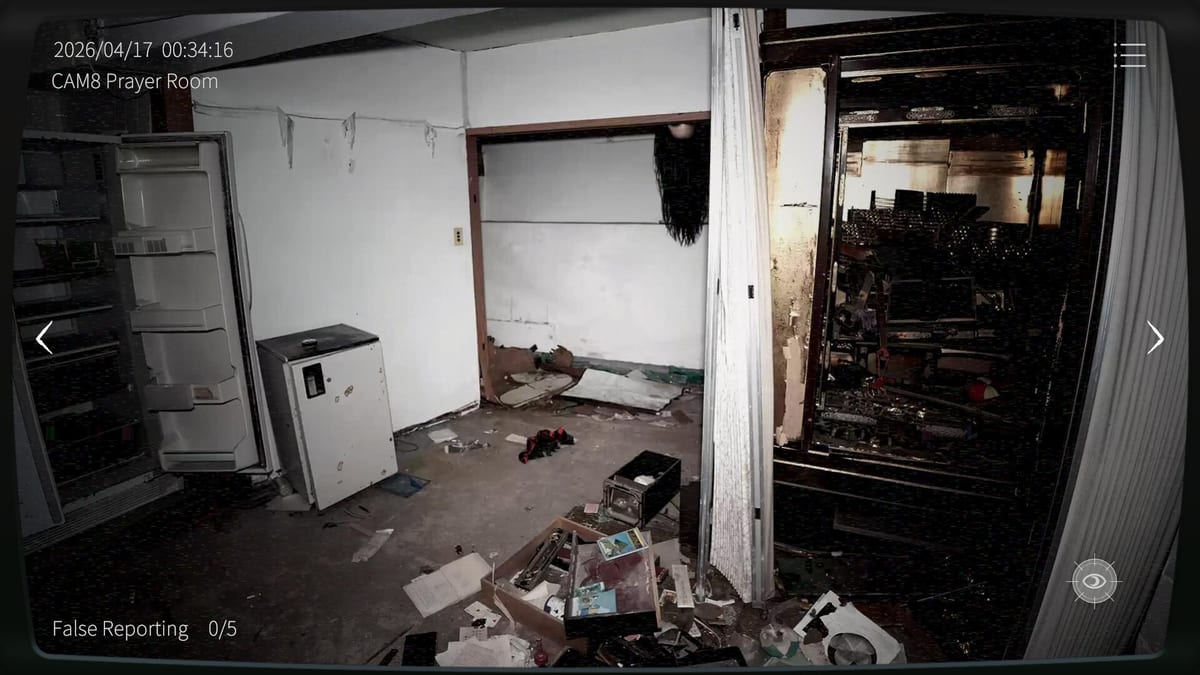
Reporting is a hold, not a tap
In Japan Stigmatized Property 3, reporting an anomaly uses mouse hold-click on the active camera feed. You commit the report by holding long enough for the action to complete. Quick clicks create the worst of both worlds: you think you reported, the anomaly remains active, and your attention has already jumped to another camera while the concurrent-miss meter quietly climbs toward four.
If the rest of How to Play is literacy, this page is penmanship. Bad report habits lose more runs than unfamiliar maps.
The verification order before every report
Use the same order every time so panic cannot invent a new process:
- Identify the camera — know which feed you are on before you hold.
- Read Normal vision — look for furniture shifts, intrusions, lights, stains, or disappearances.
- Toggle night vision with W — catch mode-locked events covered in the Night Vision Guide.
- Compare against the property’s baseline — a chair that always sat crooked is not an anomaly; a chair that moved since your last pass is.
- Hold-click to report only after the anomaly is still present and confirmed.
- Stay on the feed until the report resolves, then resume your camera ring with A/D.
Skipping steps two through four is how false reports accumulate. Skipping step six is how you report while looking away and never notice the hold failed.
Concurrent anomalies change report priority
You fail if four anomalies remain unreported at once. That means reporting is not only accuracy work; it is queue management. When two minor object anomalies and one lighting glitch are already live, your next find is not a trivia question—it is a fuse. Prioritize:
- Dangerous ghosts with knocks or moans (see Dangerous Anomalies).
- Anomalies on cameras you will not revisit soon.
- Mode-locked anomalies that require an extra W toggle, because they are easiest to forget.
Do not spend thirty seconds debating a maybe-stain while a moaned-in ghost sits unreported on another feed.
False reports are a second fail meter
Every incorrect report spends budget. Normal allows five false reports. Hazard Pay (特別手当) allows three. The moment you are unsure, do not send it anyway. Re-check both vision modes, ask a co-op partner for thermal confirmation if available, or leave and return after one full camera cycle to see whether the frame changed. The False Reports page breaks common trap frames; Hazard Pay Difficulty explains why the smaller budget changes your personality at the desk.
Co-op reporting etiquette
In two-player online co-op with PC↔mobile cross-play, duplicate reports and contested calls waste time. Agree on rules:
- The player who first confirms an anomaly on a camera owns the report unless they explicitly hand it off.
- The partner watches adjacent cameras and listens for knocks or moans.
- Thermal camera checks are for disputed heat-like threats, not for every chair nudge.
- Call reporting Cam X before you hold so your partner does not also commit.
Co-op should reduce false reports, not double them.
Common reporting mistakes
Panic reports after jump scares. A scare is not proof. Verify.
Reporting while switching cameras. Finish the hold on the correct feed.
Trusting memory of a room from twenty minutes ago. Your baseline is the last clean pass, not opening cinematic vibes.
Ignoring mode-locked anomalies. If you only report what is obvious on Normal, night-vision-only events stack toward the four-miss fail.
Saving reports for later. Later is how concurrent stacks happen. Report confirmed threats promptly, then resume sweeping.
Practice drills that actually help
Run a Normal shift where your only goal is zero false reports, even if you play slower. Then run a shift where your only goal is never reaching three concurrent unreported anomalies, even if you report slightly earlier than feels stylish. Finally combine both. That progression teaches the real skill: fast enough to beat the stack, slow enough to protect the false-report meter.
When you can narrate why you reported—object moved, figure present, night-vision-only orb, hostile audio lead—you are ready for longer nights on Survive Until Morning and for catalog study under Anomaly Types.
Clean reports keep you employed until dawn. Sloppy holds get the Association to cut your shift short.
Frequently Asked Questions
Quick answers for Japan Stigmatized Property 3 shifts.
How do you report an anomaly in JSP3?
On the correct camera, confirm the anomaly in the proper vision mode, then mouse hold-click until the report completes. Do not tap and run.
What happens if I make too many false reports?
You fail the mission after five false reports on Normal, or after three on Hazard Pay (特別手当).
Should I report immediately when scared?
No. Verify Normal and night vision first. Panic reports are a leading cause of false-report failures.
How does co-op change reporting?
Assign ownership per camera, announce reports aloud, and use the co-op thermal camera to confirm disputed heat-related threats instead of double-reporting.